Paperless Client Onboarding: The 2026 Guide
45% of small and midsize businesses still rely on paper records (Act!, 2023). Paperless firms break even in 1 year. Here's the 4-piece stack that actually works.
Arthur Teboul
Founder, DokuTrak
On this page
You switched to e-signatures two years ago. You moved contracts to the cloud. You stopped printing intake forms. You told your team, and yourself, that the firm is paperless.
Then a new client onboards. You send them an email asking for their tax returns, a copy of their ID, and proof of address. They reply three days later with a blurry photo taken on a phone. You ask for the PDF version. They send the wrong year. You follow up again. And again.
That's not paperless. That's a digital office with a paper problem hiding in the middle.
45% of small and midsize businesses still rely on paper records for critical customer and vendor data, according to a survey by Act!.1 And the firms that do make the full transition don't regret it: 59% break even within one year, and 26% within six months.2
This guide explains what fully paperless client onboarding actually looks like, which tools handle each step, and where most firms are still leaking time and money without realizing it. For the stage-by-stage version on paper or screen, see the client onboarding process.
What Does "Paperless Client Onboarding" Actually Mean?
Most firms think they've gone paperless when they've only gone partially digital. They have some tools, but not a complete workflow. The distinction matters because gaps are where time gets wasted.
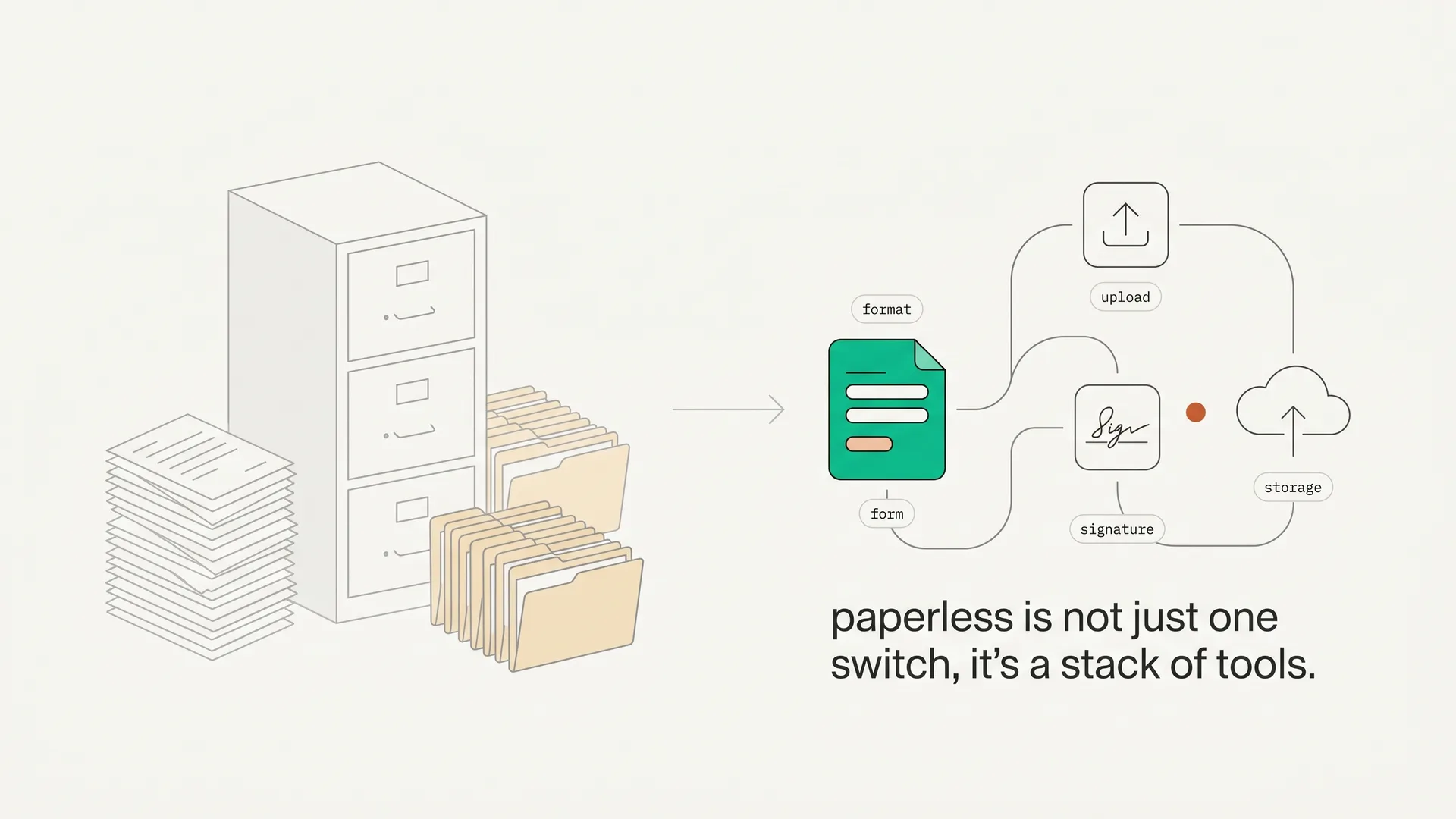
A genuinely paperless onboarding workflow covers four distinct steps:
1. Digital intake forms. Replacing printed questionnaires and PDF-fillable forms emailed back and forth. The client fills out their information in a browser, you receive structured data, nothing gets re-typed. Tools: Typeform, Jotform, HoneyBook.
2. Document collection. Replacing email attachments, WhatsApp photos, and USB drives. The client uploads their files through a dedicated portal, you see exactly what's been submitted and what's missing, and AI can flag the wrong document type before it lands in your inbox. Tools: DokuTrak, Content Snare.
3. E-signatures. Replacing wet ink on engagement letters, consent forms, and agreements. The client signs electronically, the executed document is stored automatically. Tools: DocuSign, Dropbox Sign, PandaDoc. The e-signature market reached $5.2 billion in 2024, growing at a 40.5% CAGR.3
4. Cloud storage. Replacing filing cabinets and network drives. Documents live in a searchable, permissioned system rather than in someone's Downloads folder. Tools: Google Drive, Dropbox, ShareFile.
These four categories are not interchangeable. Forms collect data. Document collection tools collect files. E-signatures handle agreements. Storage handles retention. A firm that has only covered one or two of these has not gone paperless -- it has gone partially digital.
The most common gap is step two: document collection. Most firms have e-signatures and cloud storage, but are still running document collection through email. That's the topic of most of this guide.
Why Are So Many Firms Still Using Paper (or Email)?
The honest answer is that paper and email feel like they work. The problems are invisible until they compound.
65% of UK SMEs have not yet taken steps toward going paperless, according to a YouGov survey.4 Among those firms, 31% said that if they weren't searching for documents, they would spend that time on business development. That's the real cost: not the paper itself, but the hours diverted from revenue-generating work.
The numbers from PricewaterhouseCoopers quantify the labor cost of paper-based document handling:5
- $20 in labor to file a single paper document
- $120 in labor to search for a misfiled document
- $220 to recreate a lost document
At those rates, a firm handling 50 new clients per year, each requiring a dozen documents, is spending thousands of dollars simply managing the filing step. Before a single billable hour has been logged.
The productivity drain extends beyond filing. Workers waste 20-30% of their time locating files without a centralized information system.6 83% of employees recreate files that already exist in their firm's system because they cannot find the originals.7 76% of office workers spend up to three hours per day on manual data entry -- time that digital intake forms eliminate entirely.7
Email makes this worse, not better. 58% of US workers rely on email as their primary method of sharing files.8 Email has no built-in reminders, no document validation, no visibility into what's been received and what's missing. When a client sends the wrong file, you either catch it or you don't. When they forget to attach something, you send another email. One accounting firm reduced onboarding time by 54% and cut email volume by 95% after automating client document collection.9
Has Your Industry Already Made the Shift?
The transition is not hypothetical. In several professional services verticals, digital onboarding has moved from optional to expected to mandatory.
Mortgage. 90% of mortgage lending institutions now offer digital closings, a 22% year-over-year increase.10 85% of lenders offer digital document uploads as a standard capability.11 Digital closings generate $115 to $283 in net benefit per loan through efficiency and error reduction.12 The lenders still running paper processes are not competing on speed.
Accounting. The IRS launched its Paperless Processing Initiative in August 2023, targeting the elimination of manual processing for approximately 76 million paper tax returns and 125 million pieces of paper correspondence annually.13 By filing season 2025, the IRS digitizes all paper-filed returns on receipt.14 The market signal is clear: the regulator is moving digital. Early-adopting accounting firms earn up to 39% more revenue per employee compared to late-adopter peers, according to the Rightworks 2024 Accounting Firm Technology Survey.15
Legal. E-filing is mandatory in the majority of federal courts via the CM/ECF system.16 New York State expanded mandatory e-filing to nearly all civil Supreme Court actions effective mid-2025.17 The direction is uniform across jurisdictions: paper filing is being phased out, not as a convenience but as a compliance requirement.
HR. The Department of Homeland Security permanently authorized remote I-9 verification effective August 2023, eliminating the last major legal barrier to fully paperless employee onboarding for remote hires using E-Verify.18
The common thread: regulatory pressure is removing the paper option in vertical after vertical. Firms waiting for a reason to change will eventually find the reason is a compliance deadline.
What Are the 4 Tools You Need for a Fully Paperless Workflow?
This is the practical side. For each category, what the tool does, who the main players are, and what to look for.
1. Digital Intake Forms
What they replace: Printed questionnaires, PDF forms emailed as attachments, manual transcription of client responses into your CRM.
What to look for: Conditional logic (so clients only see relevant fields), CRM integration, mobile-friendly design, and automated storage of responses.
Main tools: Typeform (best UX), Jotform (most integrations), HoneyBook (built for service businesses), Google Forms (free, no frills).
The gap they don't fill: Forms collect text and selections. They do not collect files. A client can fill out a Typeform and still need to email you their passport scan separately. Forms and document collection are complementary, not interchangeable.
2. Document Collection
What they replace: Email attachments, WhatsApp messages, shared Dropbox folders with no structure, printed-and-scanned documents.
What to look for: No-login access for clients (friction kills completion rates), per-document accept/reject with feedback, automated reminders, AI validation to catch wrong document types, and audit trail for compliance.
Main tools: DokuTrak and Content Snare are the purpose-built options. All-in-one platforms like TaxDome (accounting) and Clio (legal) include document collection, but as one feature within a larger suite.
DokuTrak specifics: Clients receive a secure upload link and upload without creating an account. You see a live checklist of submitted vs. missing documents, accept or reject each file with one click and optional feedback, and AI validation flags mismatched document types before they reach your review queue. Starts at $79/month.
Content Snare benchmark: Users report a 71% reduction in time spent collecting client information and a 77% reduction in associated costs, with a reported 23.9x ROI.19
The gap most firms leave open: Even firms with e-signatures and cloud storage are often running document collection through email. This is the single most common failure point in an otherwise digital workflow, and it's where the biggest time savings are available.
See how DokuTrak solves the document collection gap
3. E-Signatures
What they replace: Printing agreements, signing by hand, scanning, emailing back. Or worse, scheduling an in-person signing appointment.
What to look for: Legally binding signatures (eIDAS in EU, ESIGN/UETA in US), audit trail, template library for repeated document types, and API access if you need to trigger signatures programmatically.
Main tools: DocuSign (the established market leader), Dropbox Sign (formerly HelloSign), PandaDoc (strong for proposals), Adobe Acrobat Sign.
The ROI case: E-signatures can cut processing times by up to 80% compared to paper-based signing.20 For a mortgage broker closing 20 loans per month, that's a measurable reduction in days-to-close.
What e-signatures don't do: They handle agreements you send to clients. They don't handle documents clients send to you. Those are two different directions of document flow, and they require different tools.
4. Cloud Storage and Document Management
What they replace: Filing cabinets, shared network drives, email threads as the de facto document archive.
What to look for: Role-based access controls, version history, full-text search, retention policies for compliance, and integrations with the rest of your stack.
Main tools: Google Drive and Dropbox for generalist use; ShareFile and NetDocuments for regulated industries with stricter compliance requirements.
The integration warning: Only 26% of document and records management systems integrate with other core business applications.21 This fragmentation is a real problem. If your document management tool doesn't connect to your CRM, your e-signature tool, or your document collection portal, you're manually moving files between systems -- which is a digital version of the paper problem.
The Collection Gap: Why Email Survives in Otherwise-Digital Firms
Here's the specific failure mode to watch for.
A firm has DocuSign for contracts. They have Google Drive for storage. They have a Typeform for intake. On paper -- or on their tech stack slide -- they are digital. But when they need a client's tax returns, proof of address, and three months of bank statements, they send an email.
The client responds three days later. They attached the wrong year's returns and forgot the bank statements. There is no reminder system. There is no checklist the client can reference. There is no visibility into whether the email was even opened.
This is where most paperless transitions stall. The tools exist for every other step, but document collection defaults back to email because email is familiar, and because setting up a proper collection workflow feels like a project. (Our free new client onboarding checklist gives the client the reference list they were missing, and turns it into one upload link in a click.)
It is not a project. DokuTrak takes about 20 minutes to configure a document request template and send the first no-account upload link. After that, reminders run automatically, the client sees exactly what's needed, and you get a notification when everything is in.
For a detailed comparison of document collection software, including all major platforms with verified 2026 pricing, see the dedicated guide.
What Is the ROI of Going Fully Paperless?
The case is not just operational. It's financial.
59% of businesses that implemented paperless office software broke even within one year. 26% achieved ROI within six months.2 These are not aspirational projections; they're reported outcomes from Device Magic's survey of firms that had already made the transition.
For accounting specifically: firms with fully digital workflows earn up to 39% more revenue per employee than late adopters.15 At a 5-person firm billing $200k/year per employee, a 39% increase means $390,000 in additional annual revenue. That's not a rounding error.
The productivity numbers support it. Client-facing document portals can boost productivity by 35% compared to email-based collection, and firms automating document collection report spending 71% less time gathering information.9
The math from a single bottleneck is straightforward: when a broker spends meaningful time each week chasing documents, every avoided follow-up creates more room for client work and faster file review. DokuTrak's Team plan is priced for small firms that need that workflow without buying a broad enterprise suite.
For a broader look at the client onboarding software landscape -- including CRM and practice management tools -- see the full buyer's guide.
How Do You Transition a Firm That's Still on Email?
The answer is not to buy all four tools at once and run a firm-wide rollout. That's how transitions fail.
Start with the biggest bottleneck. For most professional services firms, that's document collection. Pick one client type (say, new mortgage applications) and run all document collection through a dedicated tool for 30 days. Measure the before and after in hours spent on follow-up.
Then add forms. Once document collection is running smoothly, layer in digital intake forms for structured data collection. Connect them to your CRM if possible.
Then add or upgrade e-signatures. Most firms already have some e-signature capability. Audit whether it's being used consistently or whether staff are still printing occasionally.
Then clean up storage. A proper DMS is the last piece, and the hardest to change because it touches everything. But by this point, the rest of your workflow is generating structured, named, validated documents -- which makes organizing storage far simpler.
The key is sequence. Start where the pain is loudest. For most firms, that's the collection gap.
For the full picture on client portal software -- including which platforms combine multiple pieces of this stack -- see the pillar guide.
Where Should You Start Your Paperless Transition?
Going paperless is not a single decision. It's four decisions: intake forms, document collection, e-signatures, and storage. Most firms have made two or three of them and left the others on the roadmap.
The collection gap is where the time goes. It's the step that keeps firms on email even when everything else is digital, because there wasn't an obvious tool to replace it, or because the tools that existed required clients to create accounts.
That problem is addressed with no-account upload links, no account creation, and request-level tracking. The firms earning 39% more revenue per employee didn't get there by buying more software. They got there by closing the gaps in their existing workflow.
Start your 14-day free trial of DokuTrak -- first client request free, no card, then a 14-day trial you can cancel anytime. The Solo plan starts at $79/month. If you onboard more than one client per month, the math works on day one.
Footnotes
-
Act! survey, as reported by Alpha Software, The Case for Going Paperless. https://www.alphasoftware.com/blog/the-case-for-going-paperless-eye-opening-stats-on-document-management (retrieved 2026-06-14) ↩
-
Device Magic survey, as cited by FileCenter, Document Management Statistics 2026. https://www.filecenter.com/blog/document-management-statistics/ (retrieved 2026-06-14) ↩ ↩2
-
Grand View Research, Digital Signature Market Report 2024. https://www.grandviewresearch.com/industry-analysis/digital-signature-market-report ↩
-
YouGov survey cited by Corcentric, Why Businesses Don't Go Paperless. https://www.corcentric.com/blog/why-businesses-dont-go-paperless/ ↩
-
PricewaterhouseCoopers research as reported by Square 9. https://www.square-9.com/blog/understanding-paper-costs-4-faqs/ (retrieved 2026-06-14) ↩
-
PairSoft, Paper Waste Statistics. https://www.pairsoft.com/blog/paper-waste-statistics-need-know/ (retrieved 2026-06-14) ↩
-
Zapier and M-Files data cited by FileCenter, Document Management Statistics 2026. https://www.filecenter.com/blog/document-management-statistics/ (retrieved 2026-06-14) ↩ ↩2
-
Progress.com, 3 Problems with Email Attachments. https://www.progress.com/blogs/3-problems-email-attachments-file-interception-data-leakage-compliance ↩
-
UseCollect, 10 Steps for Standardizing Client Onboarding. https://www.usecollect.com/blog/10-steps-for-standardizing-client-onboarding (retrieved 2026-06-14) ↩ ↩2
-
Snapdocs, The State of eClose Adoption. https://www.snapdocs.com/resource-center/press-release/the-state-of-eclose-adoption ↩
-
Wolters Kluwer, 2024 Mortgage Industry Technology Survey. https://www.wolterskluwer.com/en/expert-insights/technology-and-digital-closing-solutions-are-top-priorities-for-the-mortgage-industry-in-2024 ↩
-
The Mortgage Point, Lenders Reporting Increased Profit via Digital Closings, December 2024. https://themortgagepoint.com/2024/12/02/lenders-reporting-increased-profit-via-digital-closings/ ↩
-
IRS, IRS Launches Paperless Processing Initiative, August 2023. https://www.irs.gov/newsroom/irs-launches-paperless-processing-initiative ↩
-
IRS, IRS Achieves Key Paperless Processing Initiative Goal, 2024. https://www.irs.gov/newsroom/irs-achieves-key-paperless-processing-initiative-goal-outlines-improvements-for-filing-season-2024 ↩
-
Rightworks, 2024 Accounting Firm Technology Survey. https://www.rightworks.com/news/2024-accounting-firm-technology-survey/ (retrieved 2026-06-14) ↩ ↩2
-
US Courts, Electronic Filing CM/ECF. https://www.uscourts.gov/court-records/electronic-filing-cm-ecf ↩
-
LexisNexis, The End of Paper Filings: New York's eFiling Expansion, 2026. https://www.lexisnexis.com/community/amp-insights/124/the-end-of-paper-filings-how-new-yorks-efiling-expansion-is-reshaping-litigation-in-2026 ↩
-
EmplTrust, DHS Launches New I-9 Form and Remote Verification Option, 2023. https://www.emptrust.com/dhs-launches-new-i-9-form-and-remote-verification-option-for-employers/ ↩
-
Content Snare customer survey (vendor-reported), Document Collection Software. https://contentsnare.com/document-collection-software/ (retrieved 2026-06-14) ↩
-
UseCollect, 10 Steps for Standardizing Client Onboarding. https://www.usecollect.com/blog/10-steps-for-standardizing-client-onboarding (retrieved 2026-06-14) ↩
-
FileCenter, Document Management Statistics 2026. https://www.filecenter.com/blog/document-management-statistics/ (retrieved 2026-06-14) ↩
Frequently asked questions
Is paperless client onboarding legally compliant?
Yes, in virtually all professional services contexts in the US, EU, and UK. E-signatures are legally binding under ESIGN and UETA in the US, eIDAS in the EU, and the Electronic Communications Act 2000 in the UK. Digital document submissions are accepted by the IRS, federal courts, and most state courts.
What is the difference between paperless and document management?
Paperless refers to the process: collecting and handling documents without physical paper or print-scan-email steps. Document management refers to the system for organizing, accessing, and retaining documents after they are collected. You need both, a paperless collection process and a document management system for ongoing storage.
Do clients actually use self-serve upload portals?
Yes, with the right design. The critical variable is friction. If clients must create an account, download an app, or remember a password, completion drops sharply. Tools that use no-account upload links, where the client clicks straight from an email, keep completion high because there is nothing to sign up for.
What about clients who are not tech-savvy?
No-account upload portals need nothing more than clicking a link and uploading a file, the same skills as attaching something to an email. In practice, clients who struggle with email attachments often find a purpose-built portal easier, because the interface shows exactly what is needed and confirms each upload.
Is client data secure in paperless onboarding tools?
Reputable tools encrypt files in transit with TLS and at rest with AES-256, and the mature ones pursue SOC 2 attestation. DokuTrak encrypts files at rest on Cloudflare R2, serves them over TLS with short-lived scoped access, and scans every upload for malware. That posture is typically stronger than email, where files sit in multiple inboxes.
Does DokuTrak use AI to check whether a client uploaded the right document?
Yes. During onboarding, DokuTrak runs an AI first pass on each upload and flags a wrong document type, an unreadable scan, or an expired file before it reaches you. The AI flags the problem; you still decide whether to accept it. That closes the most common gap in an otherwise digital workflow.
Keep reading
More on collecting documents without the chase.
Client Portal for Nonprofits (Grants and Beneficiary Docs)
A client portal for nonprofits collects grant and beneficiary documents via a no-account upload link, with auto-reminders before deadlines and AI flags on bad files.
Client Portal for Wealth Management and CFPs
The best client portal for wealth management collects statements, tax returns, and KYC docs via a no-account upload link, with AI flags and auto-reminders.
Client Portal for Tax Preparers: Collect Tax Docs Faster
The best client portal for tax preparers collects W-2s, 1099s, and receipts with no client login, auto-reminders, and AI flags for wrong or unreadable files.
Done reading?
Stop chasing clients for documents.
DokuTrak sends secure upload links, fires automated reminders, and collects everything in one searchable vault. Try it on a real client.